Know what's really going on inside your Ford EV.
Your Mach-E or Lightning already checks its own battery every day. This app shows you what it found. Just plug a small $30 adapter in under the dash — no account, no monthly fee, nothing to sign up for.
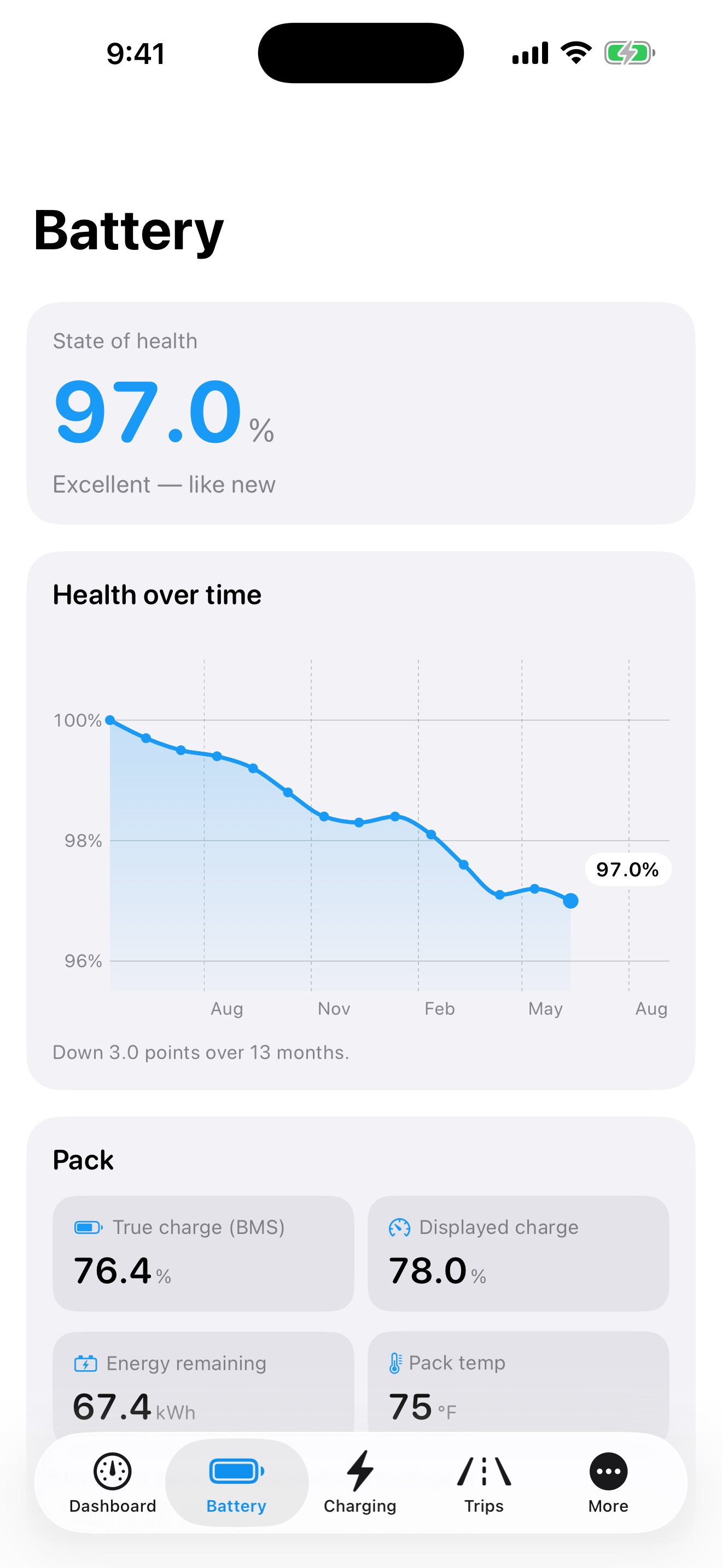
How strong is your battery today? Now you'll know.
Your car grades its own battery every day — it just never shows you the grade. The app reads it straight from the battery's computer and saves it every time you connect. Watch how your battery ages, month after month.
- SOHYour battery's health score with a simple chart over time. Great for the forum — or for the buyer when you sell.
- mVCell check — the battery is made of small groups that should all match. If one starts slipping, you'll see it years before any warning light.
- kWhHow much battery you really have left, compared to the day it was new.
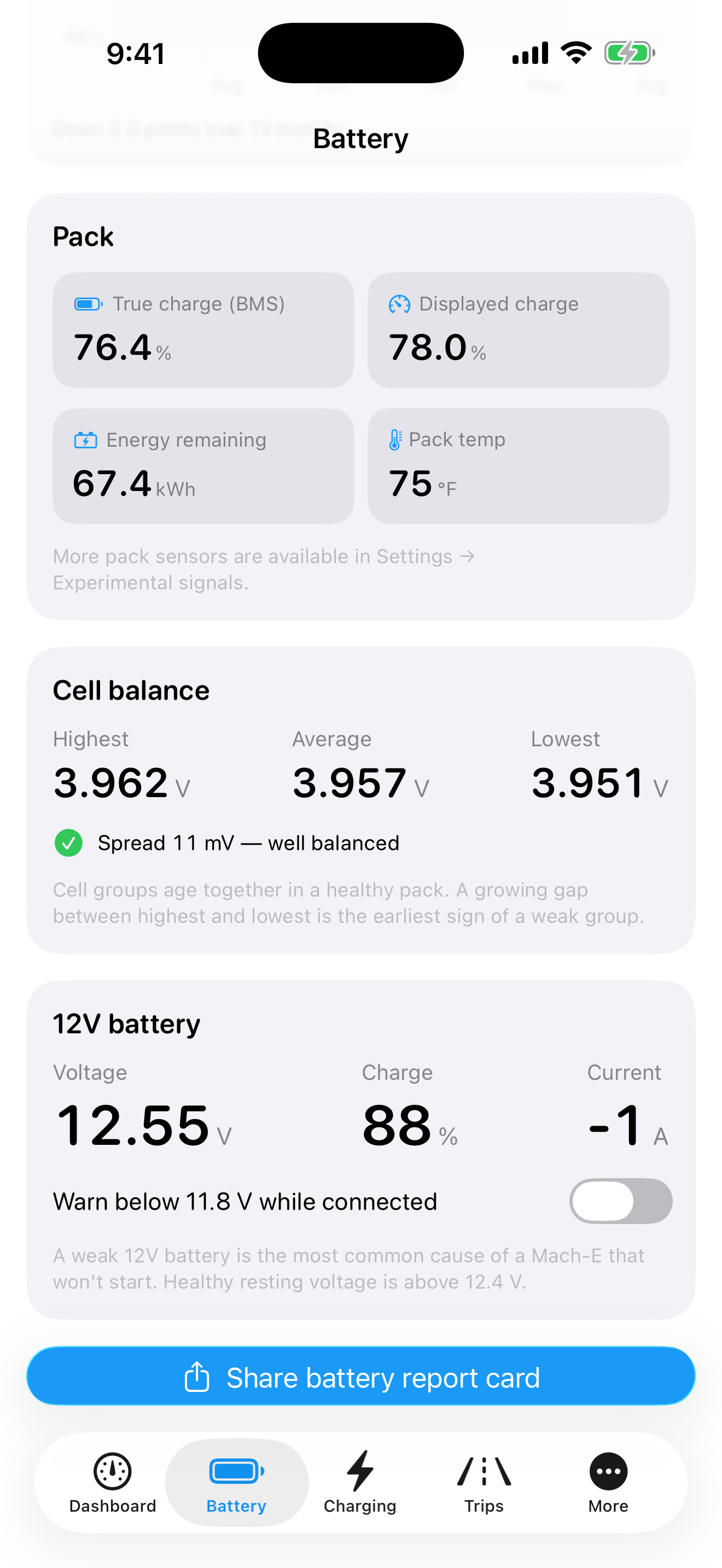
Watch your car charge. Live.
See the power flowing in, right now — at a fast charger or in your own garage. It even shows on your Lock Screen, so you don't have to keep the app open.
- kWReal charging speed — the peak, the total added, and how long until you hit your charge limit.
- EVSECharging slow? See if it's the cord or the car — so you fix the right thing.
- LOGEvery charge saved — when, how much, and what it cost you.
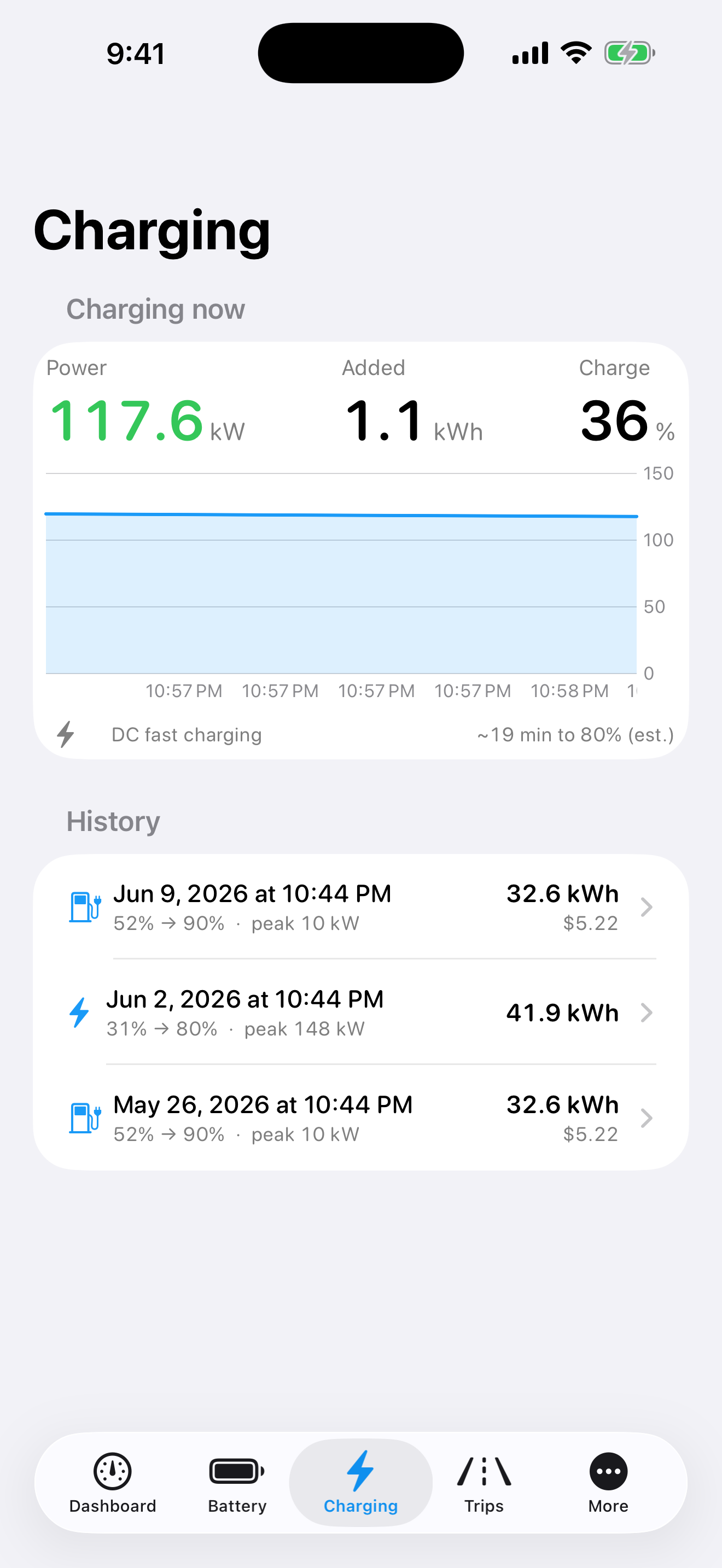
Trouble codes in plain English.
When something's wrong, your car stores a code. The app finds those codes and explains them in normal words — what happened, and how serious it is.
- DTCThe codes that matter for an electric car — battery, charging, and safety codes — each explained, with how urgent it is.
- 12VThe little battery that strands people. Most no-starts come from the small 12-volt battery. Get a warning before it dies.
- PSITires and trips — pressure for all four tires, plus how far each drive went and what it cost.
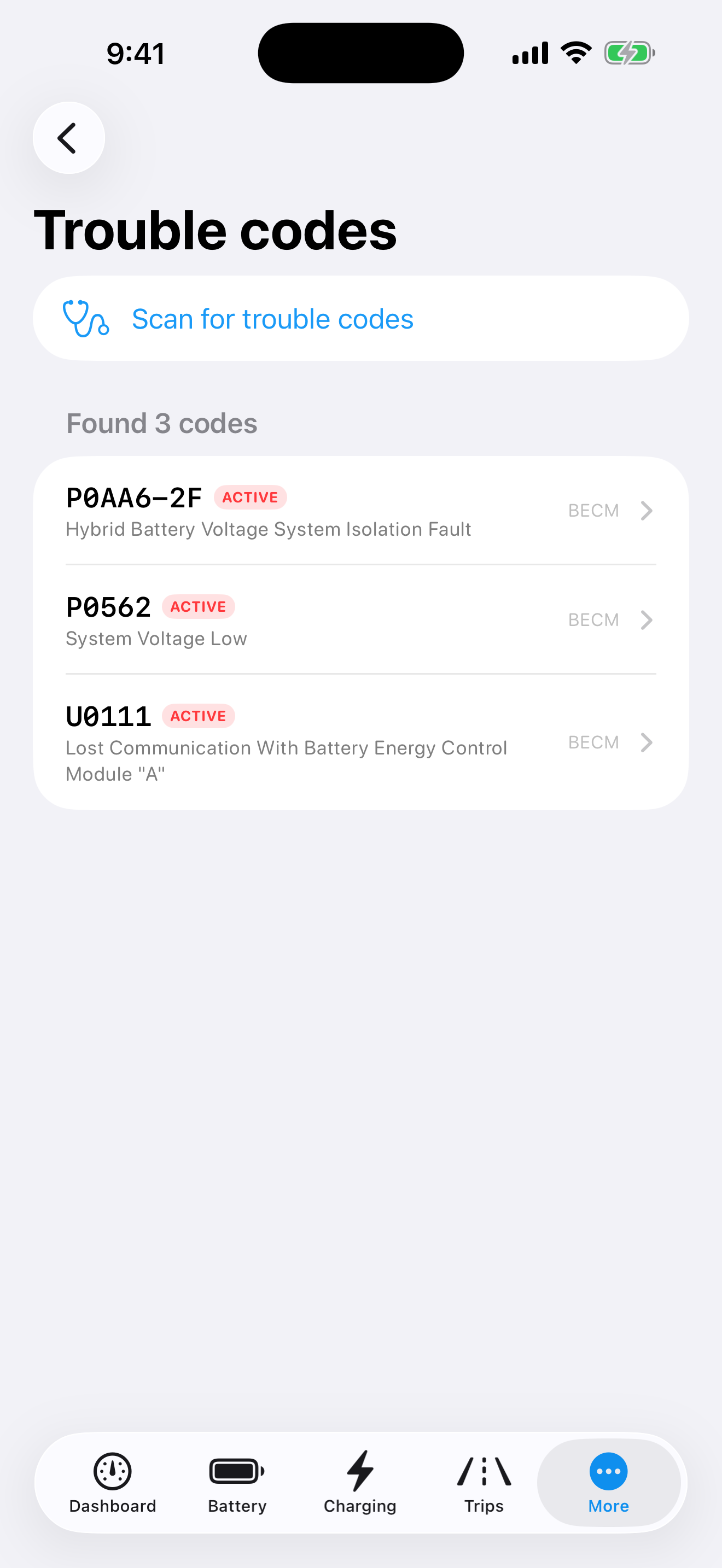
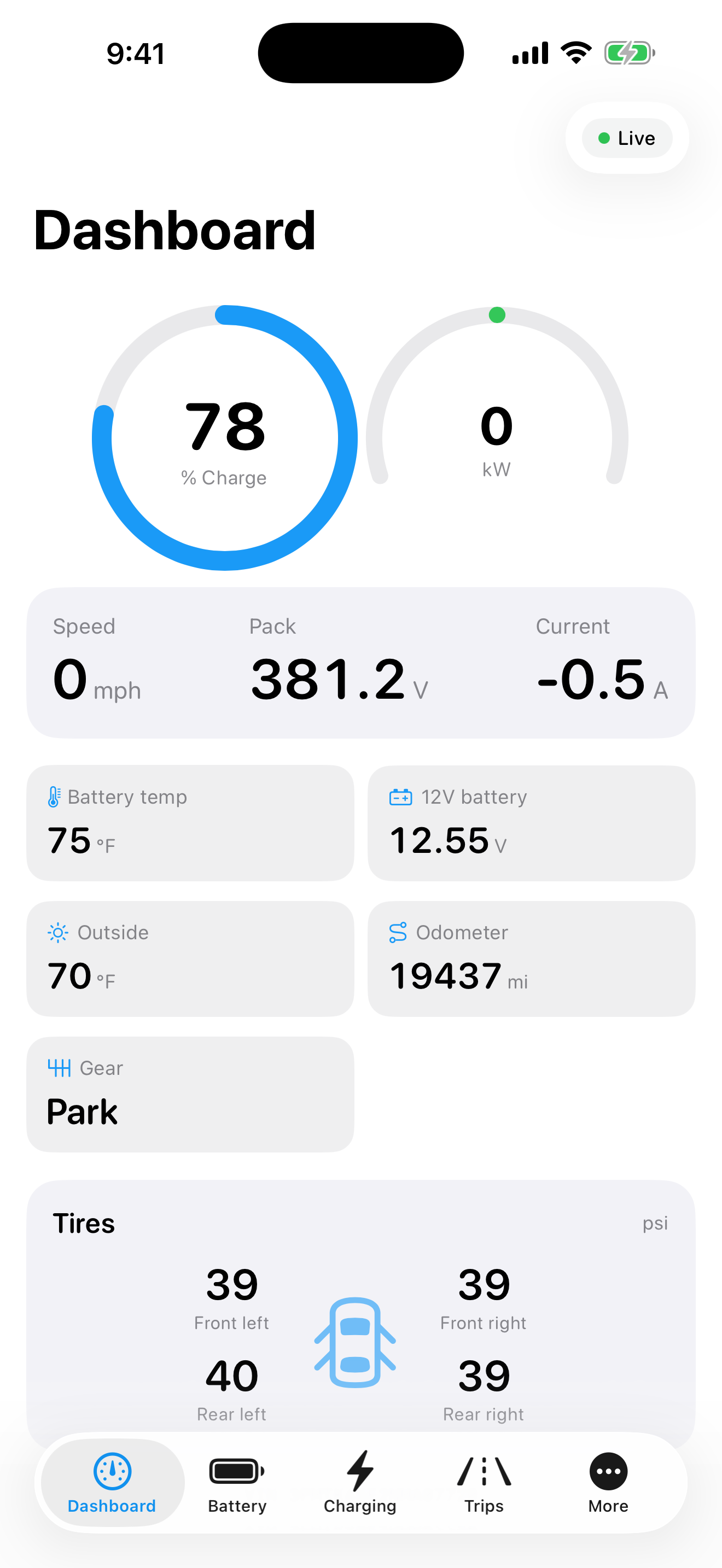
Everything the app can show you.
Over 30 live readings, straight from your car's own computers. Every one comes from documented sources, checked on real cars — we never guess.
+ VIN auto-detection · multi-vehicle garage · CSV export · widgets · Siri
Get a $30 adapter
It's a small plug that lets your phone talk to your car. We like the vLinker FS and OBDLink CX — here's why.
Plug it in once
The port is under the dash, left of the steering wheel. Plug it in once and forget it's there.
Connect and read
Open the app and tap Connect. Your battery's real numbers show up — and get saved, every time.
No servers. No account. Nothing to leak.
Ford cut other apps off from its servers — and bans accounts that sneak around it. This app never needed Ford's servers. Your phone reads your car, and what it reads stays on your phone. No servers also means no monthly bill to pass on to you. You pay once.
No ads. No tracking. The App Store privacy label says "Data Not Collected" because there's nothing here that could collect it.
Your phone only talks to the adapter in your car. Three floors underground with no signal, it works exactly the same.
It never touches Ford's servers — so there's no account to ban, and nothing Ford can switch off next year.
How do I check my Mach-E or Lightning battery health?
Plug a small Bluetooth adapter (about $30) into the port under your dash, open the app, and tap Connect. In about a minute you'll see your battery's health score, exact charge level, cell balance, and temperatures — read straight from the battery's own computer.
What adapter do I need?
Any Bluetooth OBD adapter of the common 'ELM327' type works. Owners love the vLinker FS and OBDLink CX, both under $40. See our adapter guide for details.
Is this safe for my car and my warranty?
The app is read-only by design. It asks your car's modules for data using the same standard diagnostic requests every repair shop scanner uses — it never writes to or configures anything. The single exception is the optional 'clear trouble codes' action, which asks you to confirm twice.
Does it need a FordPass account or Ford's servers?
No — and that's the point. Ford shut off cloud access for third-party apps and bans accounts that work around it. This app never touches Ford's servers. Your phone talks to your car, and your data stays on your phone.
What's battery state of health (SOH)?
It's your battery's strength today compared to the day it was new — measured by the car itself. A battery at 94% has lost about 6% of what it started with. Watching it over time tells you if your battery is aging normally.
What is cell balance and why does it matter?
Your battery is built from many small groups of cells that should all stay nearly equal. The app shows the highest, lowest, and average — and the gap between them. A healthy battery keeps that gap tiny. A growing gap is the earliest sign one group is going bad.
Does it work while charging?
Yes — that's one of the best parts. Watch the live kW curve during DC fast charging or home AC charging, see exactly what the wall is delivering versus what the charger can do, and keep a history of every session with energy added and cost.
Is it a subscription?
No. One purchase, yours forever. There's no server to pay for, so there's nothing to subscribe to.
Which model years are supported?
All Mustang Mach-E (2021 and newer) and F-150 Lightning (2022 and newer) years. Readings come from documented sources checked on real cars, and a built-in log makes it easy to help us double-check your exact year and trim.
Can I try it before buying?
The app includes a full demo mode with a simulated vehicle, so you can explore every screen before you ever plug in. And it's a one-time purchase backed by the App Store's standard refund process.
Know your battery. Before it surprises you.
Pay once, keep it forever. Try every screen in demo mode before you even plug in.
$14.99 · iOS 26+ · Mach-E 2021+ · Lightning 2022+